FreeLens
Pulling freelancers' scattered tools into one workspace
Freelancers wear many hats: project manager, client liaison, time tracker, and everything in between. This case study explores how I designed a focused system to support that reality, helping solo professionals stay on top of their work without juggling six tools

The problem
Scattered tools create constant friction
Freelancers run their work across separate apps for tasks, time tracking, client communication, and quoting. Every switch costs focus, details get lost between tools, and there’s no single place that shows the real status of their projects.
This led me to ask: How might I create a centralized system to streamline project management for freelancers, addressing their specific needs and pain points?
Research
Talking with Users
I conducted interviews with 5 freelancers from various fields to understand the challenges they face in managing multiple projects. These conversations helped identify common pain points, workflows, needs, and concerns.
The insights I gathered helped shape the foundation of the project, ensuring the solution addresses real problems.

Video interview with a freelancer
(blurred for privacy).
What I discovered
The qualitative data from the interviews was analyzed using affinity mapping, which helped organize insights into the following key themes and subcategories.
These categories helped highlight the most pressing challenges freelancers face.
Empathy Map
I created an empathy map to distill key insights from the user interviews, helping me better understand freelancers’ thoughts, feelings, and behaviors around managing multiple projects.
“I’ve tried integrating some tools… it gets messy. Important information gets missed if I forget to copy-paste from Slack into Trello or if I don’t update a task in real-time.”
“Pricing estimates are based on memory, and I wonder if I’m being accurate.”
Manually transfers data between tools to keep track of tasks, struggling to maintain consistency across platforms.
Frustrated and overwhelmed by tool inefficiency and the risk of errors when information isn’t updated in real time.
Pain Points Uncovered
I identified the following recurring challenges;
Freelancers rely on several tools for task management, communication, and quoting, often leading to missed details and extra manual work.
“I’ve tried integrating some tools… it gets messy. Important information gets missed if I forget to copy-paste them back into Trello or if I don’t update a task in real-time.”
Last-minute client requests and shifting priorities make it hard to stay on track, leading to stress and overwhelm.
“Scheduling is hard because priorities shift constantly.”
Many freelancers feel unsure about pricing accuracy and struggle to incorporate scope changes, risking underpayment.
“I quote new projects based off previous similar projects, and adjust it based on whether I feel it has paid off or not, but I wish there was a more accurate way.”
Unclear communication leads to delays and unmonitored changes in deliverables and deadlines, often uncompensated.
“Urgent client requests of last-minute changes can impact my focus.”
Market Research
I analyzed existing tools and platforms to uncover gaps and opportunities in the market. This included evaluating direct competitors, such as Monday, Asana, and ClickUp, as well as indirect competitors and other useful tools like FreshBooks and Grammarly.
Key Takeaways and Understandings
Tool Fragmentation: Many platforms specialize in individual aspects of project management, like task tracking or time logs, but fail to provide an integrated experience tailored to freelancers
Data Utilization: Few systems leverage historical data to improve future workflows, such as automating quotes or estimating task durations based on past performance.
Freelancer-Specific Gaps: Most tools cater to teams rather than individuals managing multiple projects, leaving freelancers without features suited to solo workflows or multi-client management.
How Might We (HMW) Questions
I used “How Might We” questions to reframe challenges as design opportunities. This helped me explore a wide range of potential directions, spanning user needs, workflow gaps, and industry standards.
How might we help freelancers manage multiple projects without losing focus or context?
How might we reduce the mental load caused by tool fragmentation and scattered workflows?
How might we ensure freelancers get compensated fairly by tracking real effort and scope changes?
Crafting the Solution
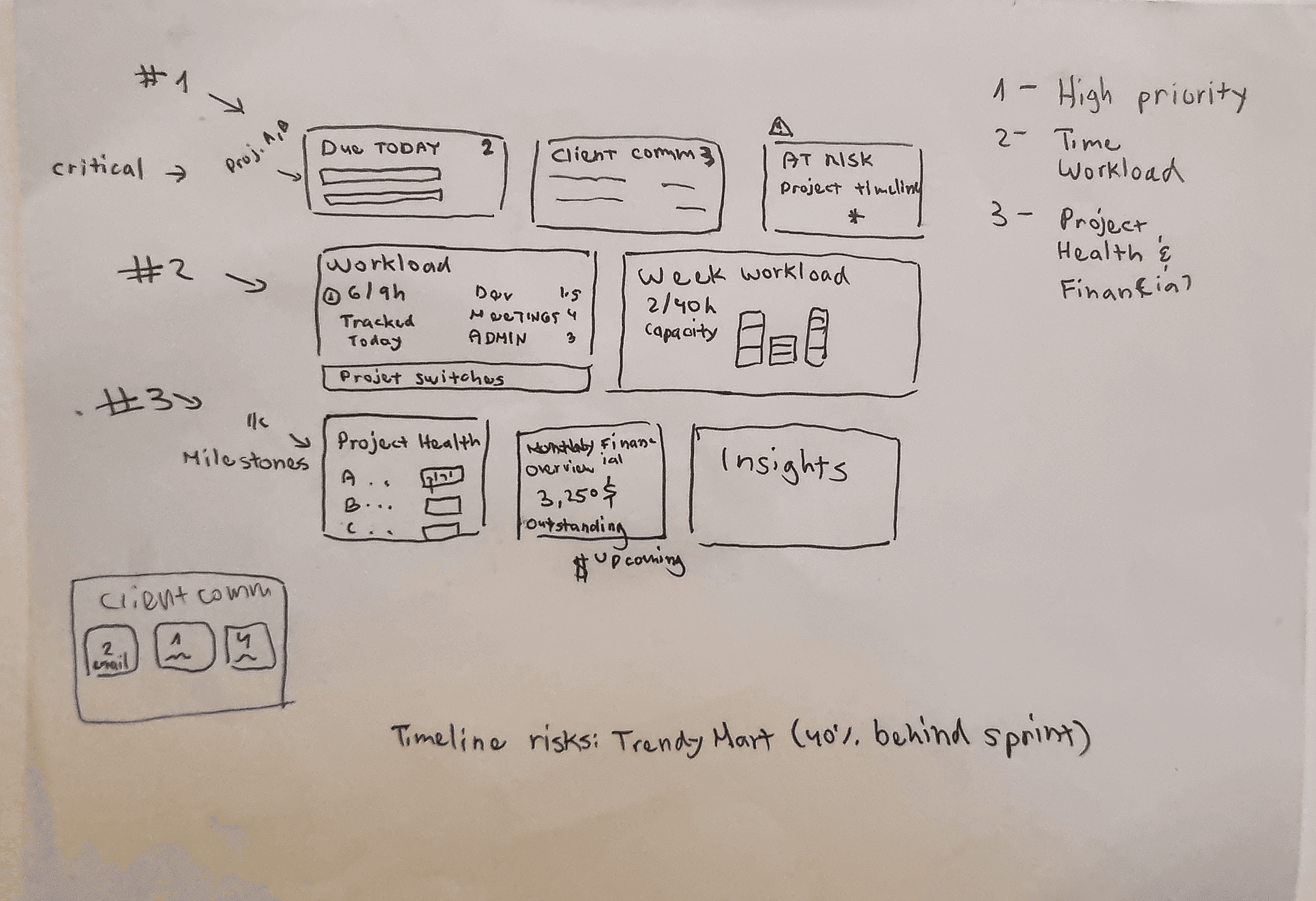
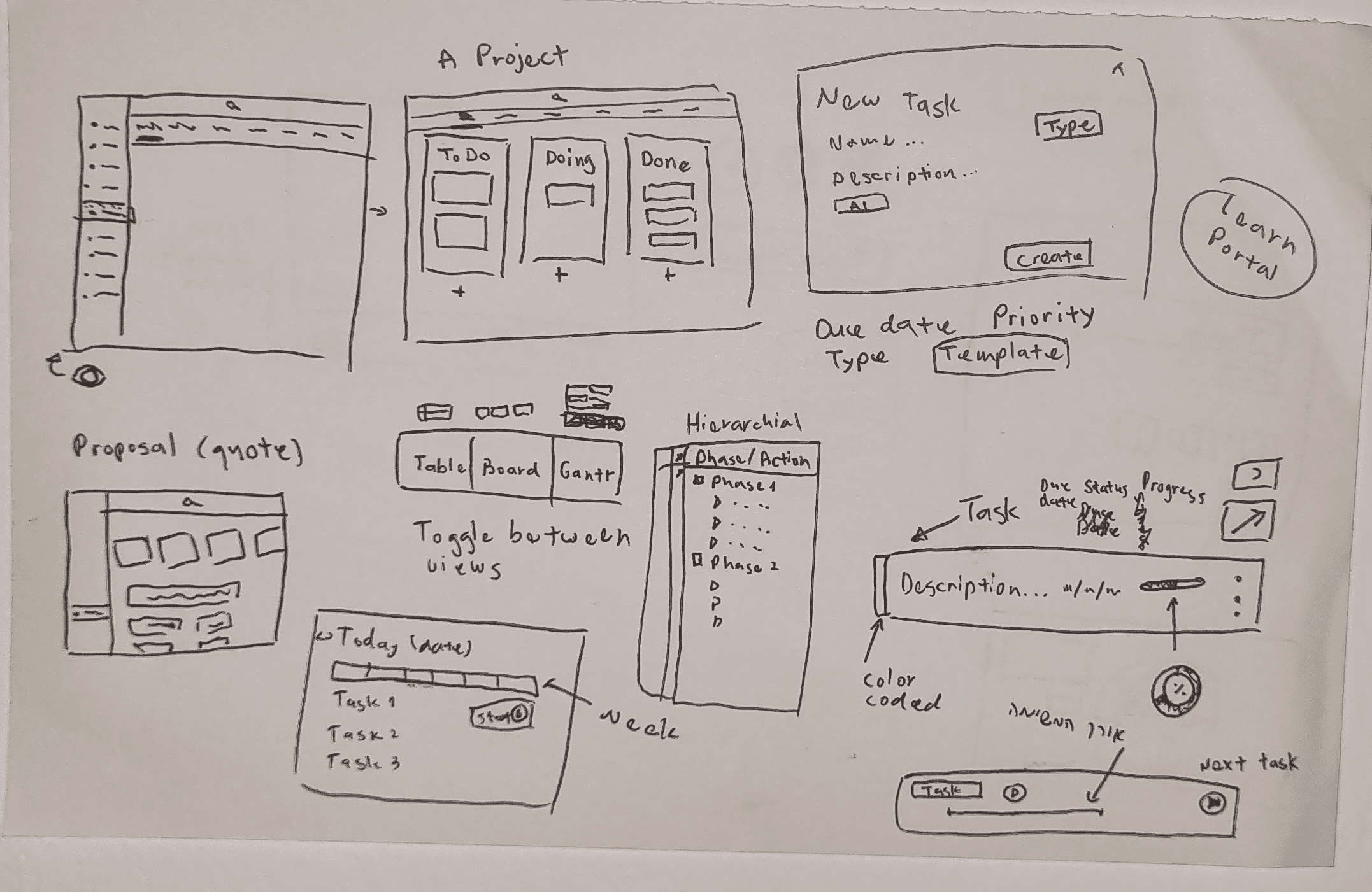
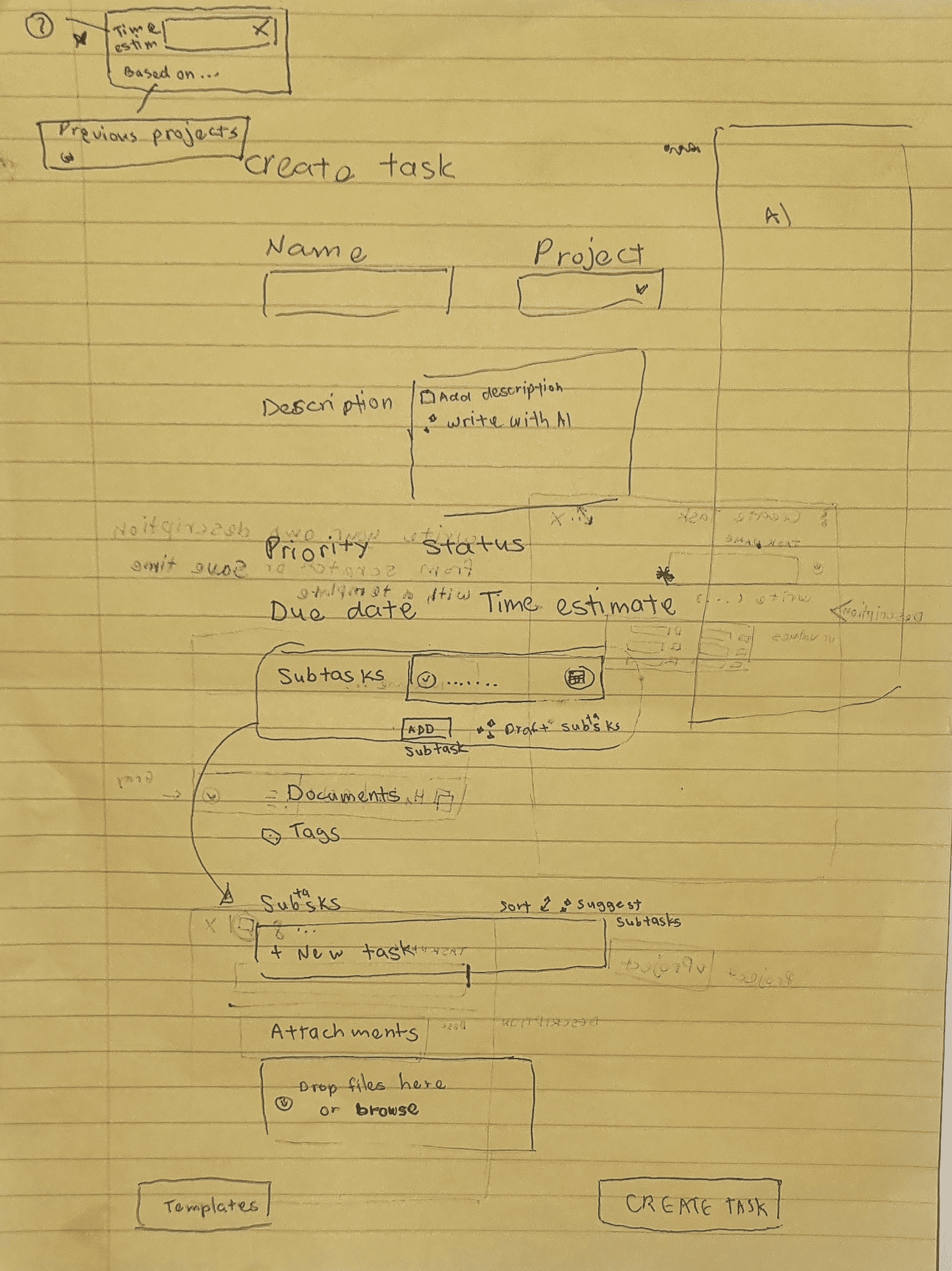
Initial Sketches
These sketches served as a blueprint, ensuring the design aligned with user needs while keeping the interface intuitive and user-friendly.
Bringing it all together: High-fidelity Screens
Quoting - Pricing Insights
Turns pricing from a gut-feel guess into something backed by data.
Line items pulled from the project - no re-entering tasks elsewhere
Rate compared against the right baseline - by project type, not a blanket average
Scope changes flagged for sign-off - addresses unpaid last-minute requests
Estimate vs. actual hours - quote with a real buffer, not guesswork

Tasks Screen
Client messages, docs, and time tracking - under one screen
Client Updates
Client messages inside the task - not a separate inbox to remember to check.
Resources
The right doc, ranked for this task - not a bookmarks folder to search.
AI Assistant
One assistant that's actually read the task - not a generic chatbot bolted on.
Subtasks
Time that adds up to something real - feeding the estimates you actually quote from.
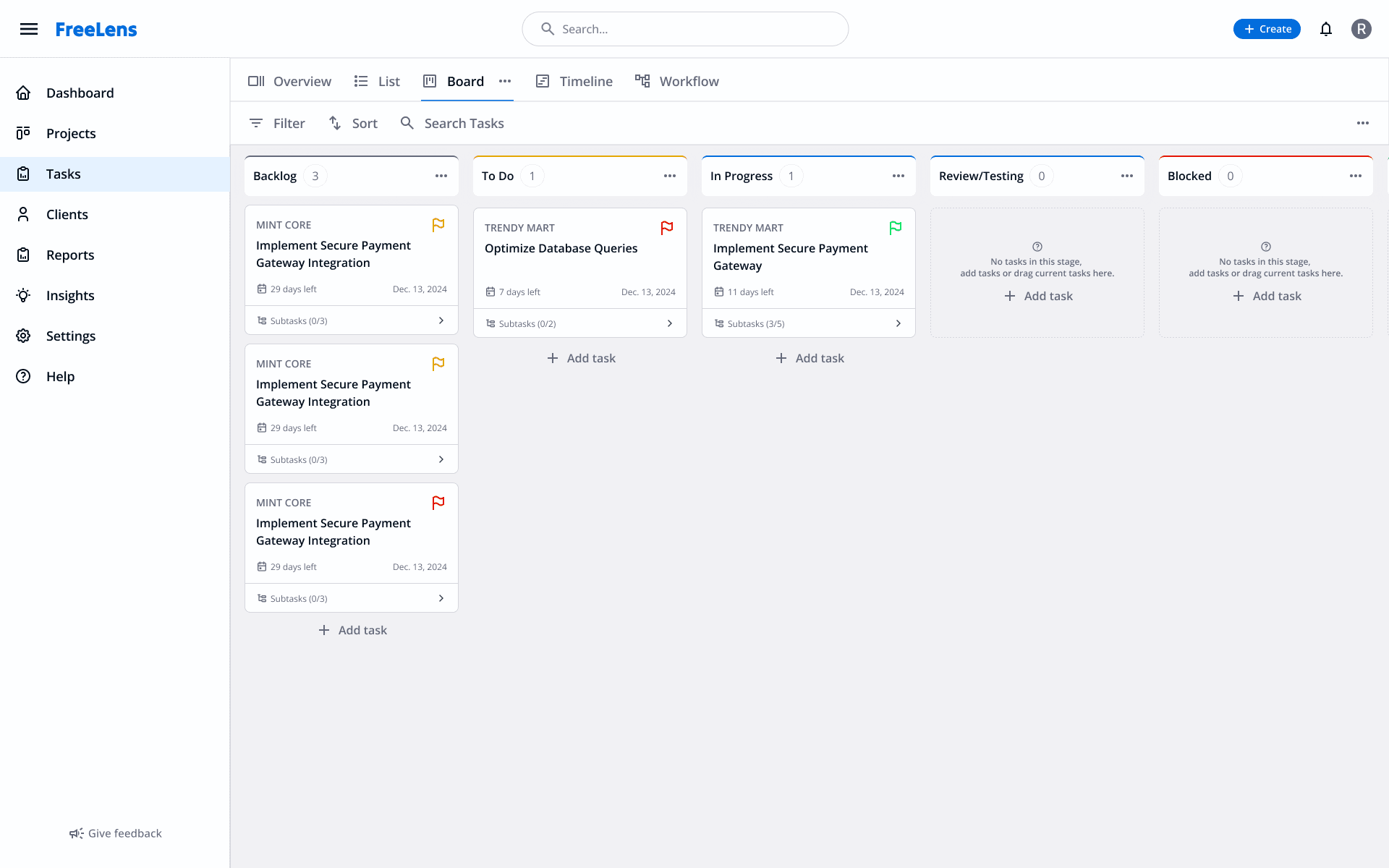
Project Prioritization (Kanban View)
Simplifies task prioritization across projects with customizable views for better project management.
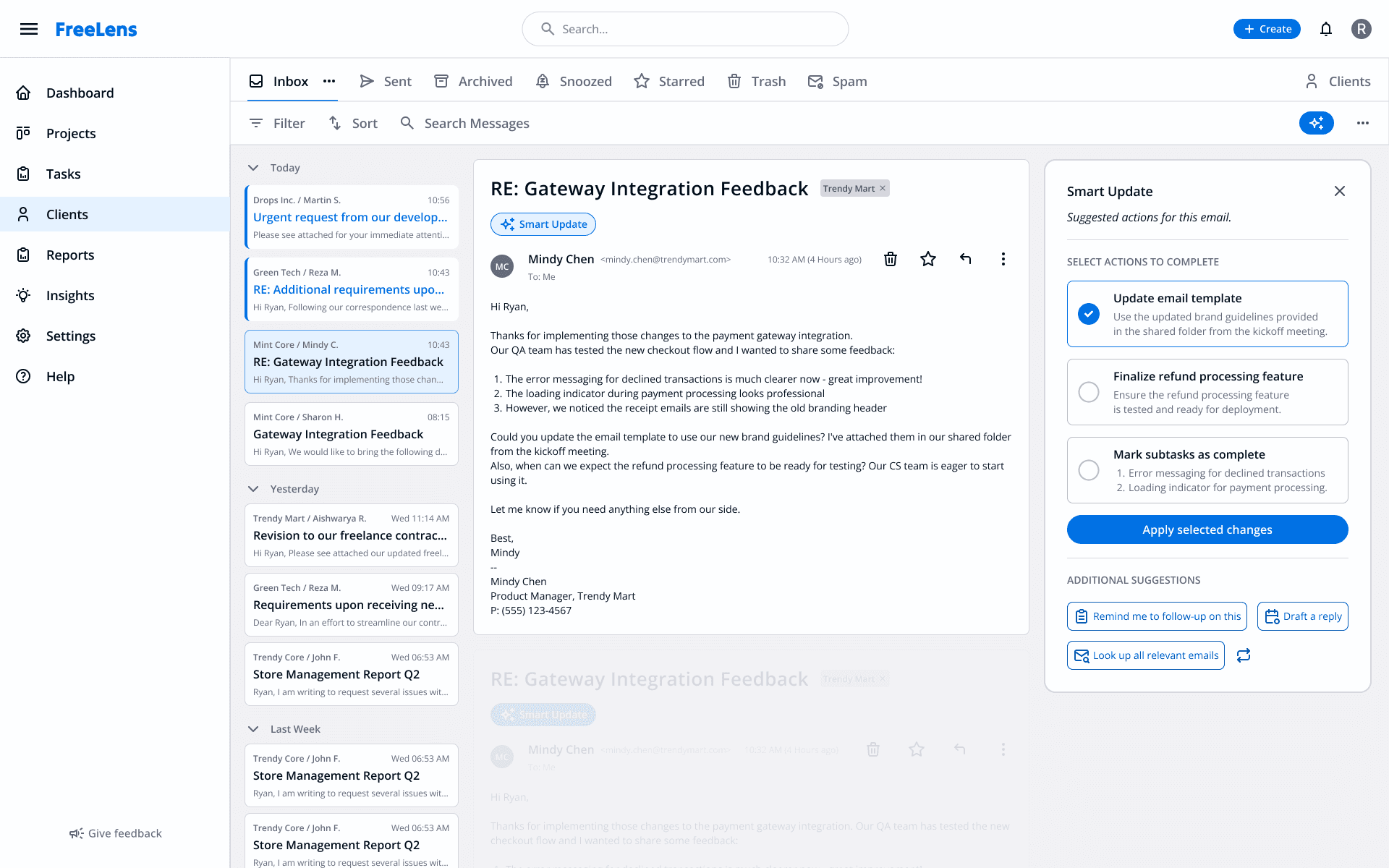
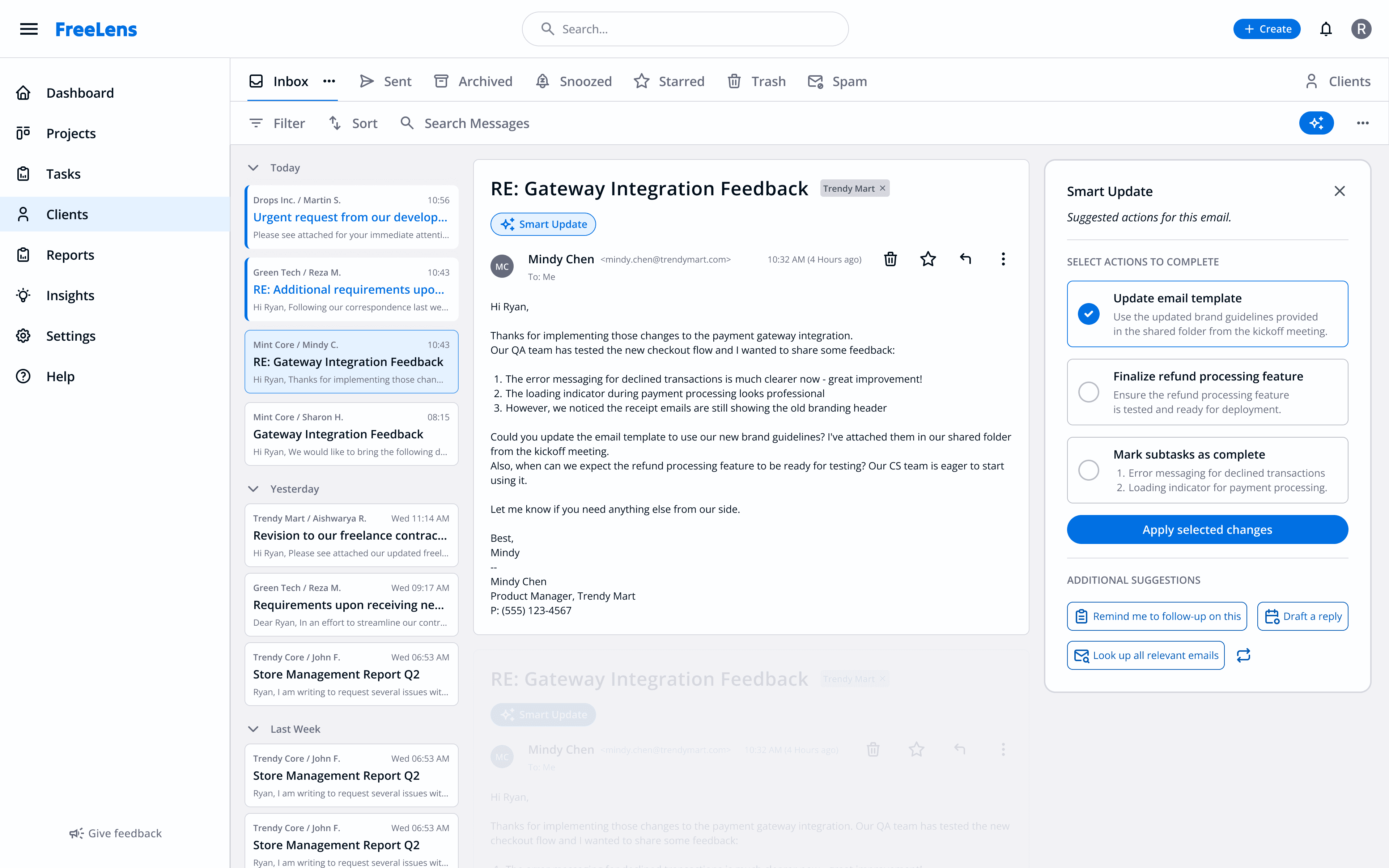
Client Communication (Smart Update)
This screen streamlines client communication by integrating emails and messages into the project management system. The 'Smart Update' feature automatically detects task updates or client requests and suggests corresponding actions, such as marking tasks as complete or updating progress. This ensures users stay on top of client needs without manual tracking, saving time and reducing the risk of missed details. Additional suggestions, like reminders and related emails, further enhance task management efficiency
and clarity.
What I learned and what’s next
Lessons Learned
Working on this project deepened my understanding of freelancers' unique challenges, like balancing shifting priorities, managing client expectations, and dealing with the mental strain of fragmented tools. I learned how crucial it is to design solutions that simplify workflows while empowering users to feel in control.
Affinity mapping helped me uncover key themes from user research, though overlapping categories made prioritization challenging. User journey mapping was invaluable for identifying high-impact opportunities and ensuring the design addressed the most pressing needs.
This experience underscored the importance of empathy, focusing on freelancers' workflows and mindsets to create a solution that truly supports their daily lives.
What’s Next?
The next phase of this project will focus on enhancing functionality through automated quoting and billing. By leveraging time logs and historical project data, the system can help users prioritize tasks and generate accurate quotes with minimal effort. Expanding this feature set to include customizable templates for quotes, billing, and project timelines will streamline workflows further and reduce manual effort.